


Using eemont in Julia
Tutorial created by **David Montero Loaiza**: GitHub | Twitter
GitHub Repo: https://github.com/davemlz/eemont
PyPI link: https://pypi.org/project/eemont/
Conda-forge: https://anaconda.org/conda-forge/eemont
Documentation: https://eemont.readthedocs.io/
More tutorials: https://github.com/davemlz/eemont/tree/master/docs/tutorials
Let’s start!
If required, please uncomment:
[ ]:
# using Pkg
# Pkg.add("Plots")
# Pkg.add("FileIO")
# Pkg.add("PyCall")
# Pkg.add("Conda")

# using Conda
# Conda.add("earthengine-api", channel="conda-forge");
# Conda.add("eemont", channel="conda-forge");

# Pkg.add("EarthEngine")
First, let’s import everything we need!
We are going to use the amazing EarthEngine.jl package, created by Kel Markert, to work with Google Earth Engine in Julia!
[1]:
using Plots, FileIO, PyCall
using EarthEngine
Now, to use eemont, we need a trick. Since there is no eemont.jl (at least not yet), we will call it from Python directly, that’s why we are using PyCall here.
[2]:
eemont = pyimport("eemont");
Let’s initialize Earth Engine!
[ ]:
Initialize()
Now, let’s create a simple ROI:
[4]:
geometry = Point(27.719481, 26.478555) |> x -> buffer(x,3500);
And since we are going to plot some spectral indices, let’s define our color palette!
[13]:
palette = ["FFFFFF", "CE7E45", "DF923D", "F1B555", "FCD163", "99B718",
           "74A901", "66A000", "529400", "3E8601", "207401", "056201",
           "004C00", "023B01", "012E01", "011D01", "011301"];
Working with Earth Engine in Julia
The cool part is coming! With EarthEngine.jl you can use the Julia syntax for Earth Engine! Let’s get the first image of Sentinel-2 L2A and clip it:
[11]:
img = clipToBoundsAndScale(first(EE.ImageCollection("COPERNICUS/S2_SR")),geometry,scale = 10);
Adding eemont to the soup
We know that eemont extends the Earth Engine classes with new methods and stuff. And since EarthEngine.jl helps you with the Julia syntax, now all eemont methods work like that too!
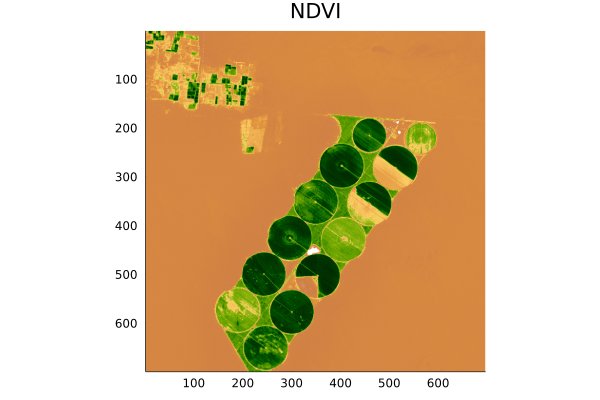
So, let’s mask clouds, scale and offset the image and compute the NDVI there!
[14]:
idx = spectralIndices(scaleAndOffset(maskClouds(img)),"NDVI");
Now, let’s get a thumbnail for visualization!
[15]:
thumburl = getThumbUrl(
    select(idx,"NDVI"),
    Dict(
        "min" => 0,
        "max" => 1.0,
        "palette" => palette,
        "format" => "png",
    )
)
And don’t forget to download it!
[15]:
localpath = download(thumburl);
And for the finale, the visualization of the NDVI!
[16]:
plot(FileIO.load(localpath),title = "NDVI")
[16]:
Pipes, pipes, pipes
If you’re more comfortable using pipes in Julia, you can also use them here!
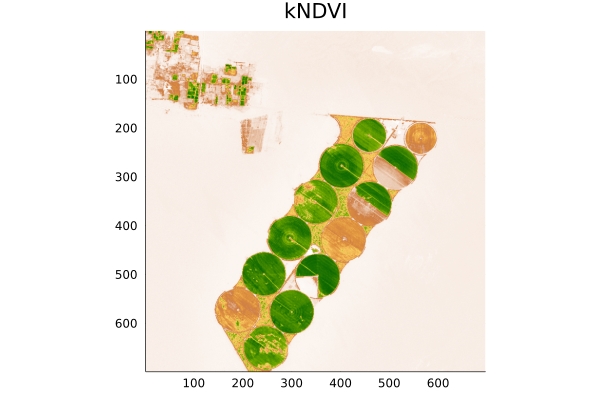
Let’s do all the preprocessing but now with pipes and computing the kNDVI instead of the NDVI:
[17]:
idx = EE.ImageCollection("COPERNICUS/S2_SR") |>
    first |>
    x -> clipToBoundsAndScale(x, geometry, scale = 10) |>
    maskClouds |>
    scaleAndOffset |>
    x -> spectralIndices(x, "kNDVI");
And that’s it! Super easy! Let’s get our thumbnail!
[18]:
thumburl = getThumbUrl(
    select(idx,"kNDVI"),
    Dict(
        "min" => 0,
        "max" => 1.0,
        "palette" => palette,
        "format" => "png",
    )
)

localpath = download(thumburl);
And visualize it!
[19]:
plot(FileIO.load(localpath),title = "kNDVI")
[19]:
Amazing! :D